React Native SDK (v2)
⚠️ Migrating from SDK v1?
This page documents App Upgrade React Native SDK v2.
If you are still using the v1 SDK, you can continue using it, but we recommend upgrading to v2 for improved API design, TypeScript support, and better developer experience.
👉 View the v1 documentation here:
React Native SDK v1
The App Upgrade React Native SDK v2 (TypeScript) provides a modern, TypeScript-based API for integrating the App Upgrade service into your React Native applications.
The SDK communicates with the App Upgrade platform and checks your application's current version against configured versions. Based on the response, it will:
- Show a non-dismissable update popup if a force upgrade is required.
- Show a dismissable update popup if an update is recommended.
- Do nothing if the app is already on the latest supported version.
Requirements
| Dependency | Minimum Version |
|---|---|
react |
>= 18.0.0 |
react-native |
>= 0.72.0 |
Installation
Install using npm:
npm install app-upgrade-react-native-sdk
Or with yarn:
yarn add app-upgrade-react-native-sdk
For Expo projects:
npx expo install app-upgrade-react-native-sdk
How to Use
1. Create a project and obtain API key
Follow the Getting Started guide to:
- Create a project
- Obtain your
x-api-key
2. Import the SDK
import { appUpgradeVersionCheck, AppUpgradeClient } from 'app-upgrade-react-native-sdk';
import type { AppInfo, AlertInfo } from 'app-upgrade-react-native-sdk';
3. Initialize the client
Create an instance of AppUpgradeClient using your API key.
const client = new AppUpgradeClient({
  apiKey: 'YOUR_API_KEY',
  debug: false
});
| Option | Description |
|---|---|
apiKey |
Your App Upgrade project API key |
debug |
Enable SDK debug logs in console |
4. Provide app information
Define the metadata of your app.
import { Platform } from 'react-native';

const appInfo: AppInfo = {
  appId: Platform.OS === 'ios'
    ? '1234567890'
    : 'com.example.myapp',

  appName: 'My App',
  appVersion: '1.0.0',
  platform: Platform.OS,
  environment: 'production',
  appLanguage: 'en'
};
| Field | Description |
|---|---|
appId |
App Store ID (iOS) or package name (Android) |
appName |
Name of your application |
appVersion |
Current version of the app |
platform |
android or ios |
environment |
Example: production, development, staging |
appLanguage |
Optional locale code such as en, es |
To learn how to find your appId, see:
How to find appId for your app
5. Configure alert dialog (optional)
You can customize the upgrade popup using the AlertInfo configuration.
const alertConfig: AlertInfo = {
  title: 'Update Available',
  updateButtonTitle: 'Update Now',
  laterButtonTitle: 'Later',

  onDismissCallback: () => {
    console.log('User dismissed the dialog');
  },

  onLaterCallback: () => {
    console.log('User selected Later');
  },

  onUpdateCallback: () => {
    console.log('User chose to update');
  }
};
6. Run version check
Call the version check inside useEffect so it runs when the app loads.
import { useEffect } from 'react';

useEffect(() => {
  appUpgradeVersionCheck(client, appInfo, alertConfig);
}, []);
Full Example
import React, { useEffect, useMemo } from 'react';
import { Platform } from 'react-native';
import { appUpgradeVersionCheck, AppUpgradeClient } from 'app-upgrade-react-native-sdk';
import type { AppInfo, AlertInfo } from 'app-upgrade-react-native-sdk';

const App = () => {

  const client = useMemo(() =>
    new AppUpgradeClient({
      apiKey: 'YOUR_API_KEY',
      debug: false
    }), []);

  const appInfo: AppInfo = useMemo(() => ({
    appId: Platform.OS === 'ios' ? '1234567890' : 'com.example.myapp',
    appName: 'My App',
    appVersion: '1.0.0',
    platform: Platform.OS,
    environment: 'production',
    appLanguage: 'en'
  }), []);

  const alertConfig: AlertInfo = {
    title: 'Update Available',
    updateButtonTitle: 'Update Now',
    laterButtonTitle: 'Later'
  };

  useEffect(() => {
    appUpgradeVersionCheck(client, appInfo, alertConfig);
  }, [client, appInfo]);

  return null;
};

export default App;
Alternative Android App Stores
The SDK supports redirecting users to alternative Android marketplaces.
Supported stores
| Apple App Store | Google Play Store | Amazon App Store | Huawei AppGallery | Other Android Markets |
|---|---|---|---|---|
| ✓ | ✓ | ✓ | ✓ | ✓ |
Example
import { PreferredAndroidMarket } from 'app-upgrade-react-native-sdk';

const appInfo: AppInfo = {
  appId: 'com.example.myapp',
  appName: 'My App',
  appVersion: '1.0.0',
  platform: 'android',
  environment: 'production',
  preferredAndroidMarket: PreferredAndroidMarket.AMAZON
};
Custom Android marketplace
If your app is distributed through a custom store:
const appInfo: AppInfo = {
  appId: 'com.example.myapp',
  appName: 'My App',
  appVersion: '1.0.0',
  platform: 'android',
  environment: 'production',
  preferredAndroidMarket: PreferredAndroidMarket.OTHER,
  otherAndroidMarketUrl: 'https://my-custom-store.com/app/myapp'
};
If the preferred marketplace cannot be opened, the SDK automatically falls back to Google Play Store.
Custom Attributes
You can optionally send custom attributes along with the version check request.
const appInfo: AppInfo = {
  appId: 'com.example.myapp',
  appName: 'My App',
  appVersion: '1.0.0',
  platform: 'android',
  environment: 'production',
  customAttributes: {
    region: 'eu',
    plan: 'premium'
  }
};
Callbacks
The SDK provides the following callbacks:
onDismissCallback
Triggered when the user dismisses the popup by tapping outside the dialog.
Available only for non-force upgrades.
onLaterCallback
Triggered when the user presses the Later button.
This can be used for analytics or to remind the user later.
onUpdateCallback
Triggered when the user presses Update Now.
Useful for analytics or cleanup tasks before redirecting to the store.
Notes
- The app must be live in the store for store redirection to work.
- Store links may not open correctly on emulators or simulators.
- If using a shared codebase for Android and iOS, detect the platform using
Platform.OS. - The version check should run once per app session.
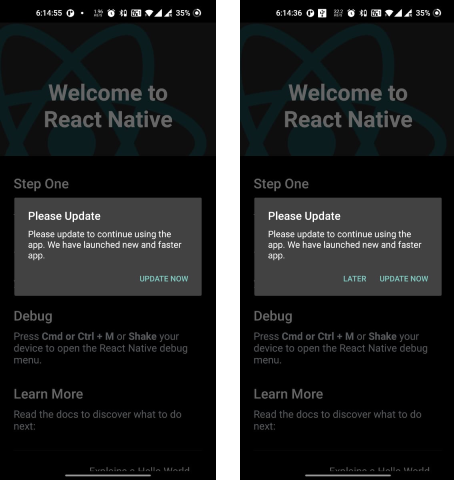
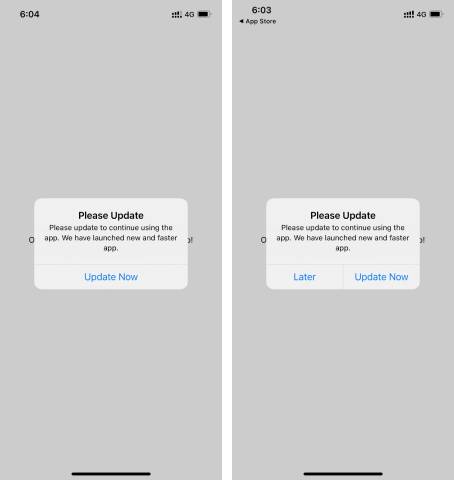
Screenshots
Android
- Force upgrade: Only Update button is enabled.
- Recommended upgrade: Update and Later buttons are available.
iOS
Changelog
Please see the project CHANGELOG for details about recent updates.
Need Help?
If you're looking for help:
- Email: support@appupgrade.dev
- Documentation: https://appupgrade.dev/docs/
results matching ""
